SOC164 – Suspicious Mshta Behavior Walkthrough (EventID:114)
Letsdefend Alert Walkthrough
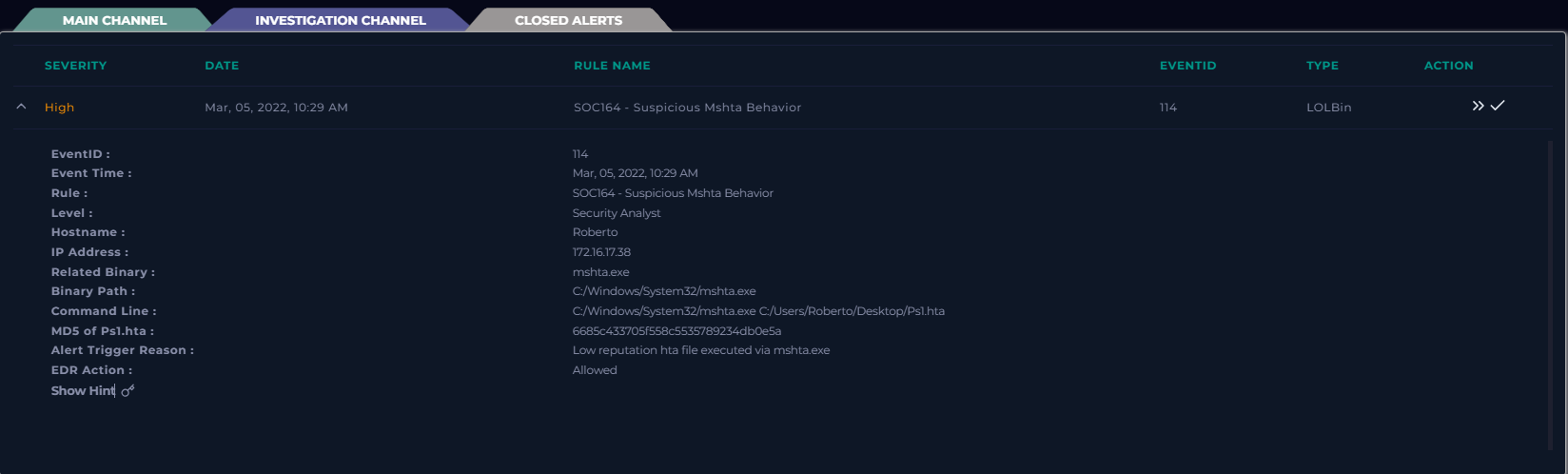
Today we’re investigating another LetsDefend alert: SOC164 – Suspicious Mshta Behavior
This alert focuses on detecting suspicious usage of a legitimate Windows binary often abused by attackers.
🔎 Alert Overview

From the monitoring page, we are provided with:
Host information
Triggered binary
Process execution details
Endpoint telemetry
Our objective is to determine whether the activity is malicious and take the appropriate response actions.
Step 1: Understanding LOLBins

At the beginning of the playbook, we are introduced to the concept of LOLBins (Living Off the Land Binaries).
LOLBins are legitimate system binaries that attackers abuse to:
Execute malicious scripts
Bypass security controls
Blend in with normal system activity
Understanding this concept is important because this alert involves a suspected LOLBin.
Step 2: Identify the Suspicious Binary

By reviewing the monitoring page and endpoint security logs, we identified the binary responsible for triggering the alert:
mshta.exe
mshta.exe is a legitimate Windows utility used to execute HTA (HTML Application) files. However, attackers frequently abuse it to execute malicious scripts remotely.
Answer: Next
Step 3: Determine if the Activity is Suspicious

Next, we examined the terminal history of the affected host Roberto.

In the command history, we observed a suspicious execution involving mshta.exe.
Since:
mshta.exewas used outside normal administrative behaviorThe command execution appeared abnormal
It potentially involved remote script execution
This activity is considered suspicious.
Answer: Yes – Suspicious
Step 4: Identify the Purpose of the Activity

To understand the intent behind the mshta.exe execution, we analyzed its behavior and checked reputation sources such as VirusTotal.
Although mshta.exe itself is legitimate, attackers commonly use it to:
Execute malicious payloads
Run remote scripts
Establish command execution capabilities
The primary purpose of this activity was execution.
Answer: Execute
Step 5: Who Performed the Activity?

Upon reviewing endpoint security findings, we did not observe malware automatically executing on the system.

This indicates that the suspicious activity was likely initiated manually by:
A user with access to the host
An attacker who had already gained system access
Therefore, the activity was performed by a user rather than automated malware.
Answer: User
Step 6: Containment Decision

Because:
A LOLBin was abused
Suspicious command execution was confirmed
The host showed potentially malicious behavior
Containment was necessary to prevent:
Further command execution
Lateral movement
Persistence mechanisms
Data exfiltration

The host system was isolated from the network.
Action Taken: Host Containment
Step 7: Artifact Collection

After containment, relevant artifacts were added, including:
Suspicious binary (
mshta.exe)Command execution logs
Affected hostname (Roberto)
Timeline of execution
Proper artifact documentation ensures traceability and supports further investigation if escalation is required.
Step 8: Analyst Notes


As part of my workflow, I always document findings during the investigation process.
This helps:
Maintain structured reporting
Ensure clarity in escalation
Provide useful context for Tier 2 analysts
Improve investigation efficiency
After documenting the analyst note, the alert was closed.
✅ Final Result
After submitting all responses and reviewing the results:

All answers were correct.
This confirms that the suspicious behavior was accurately identified, analyzed, and handled properly.
About the author
Hi, I’m Ridesh — a Computer Engineering student on the path to becoming a SOC Analyst. I’m here to share my journey of learning cybersecurity, building projects, and improving my mindset while growing publicly. I’m passionate about cyber defense, psychology, philosophy, ancient wisdom, anime mindset lessons, and everything that builds mental strength. My goal is simple: Build a strong cybersecurity foundation, grow consistently, and connect with people who think like me. If you’re on a similar journey, you’re in the right place — let’s learn and grow together.
Comments
Join the discussionNo comments yet. Be the first to comment.


